JSON viewer & JSON editor for Android
Open JSON files on your phone — and actually read them.
Sonnet turns any JSON file into a clean, collapsible tree: the API response in your downloads, the config someone sent you, the export that is one enormous line. Tap a value to edit it, flip between formatted and minified, and never send a byte of it anywhere — it all happens on the phone.
 Free · no ads · no account
Works offline
{
  name: "Ava Thompson",
  "plan": 'pro',
  "active": true,
  "orders": [128.5, 64.0],
  "coupon": null
}
- root: { … }
- name: "Ava Thompson"
- plan: "pro"
- active: true
- orders: [ … ]
- [0]: 128.5
- [1]: 64.0
- coupon: null
JSON tree viewer
Messy in, readable out — every time
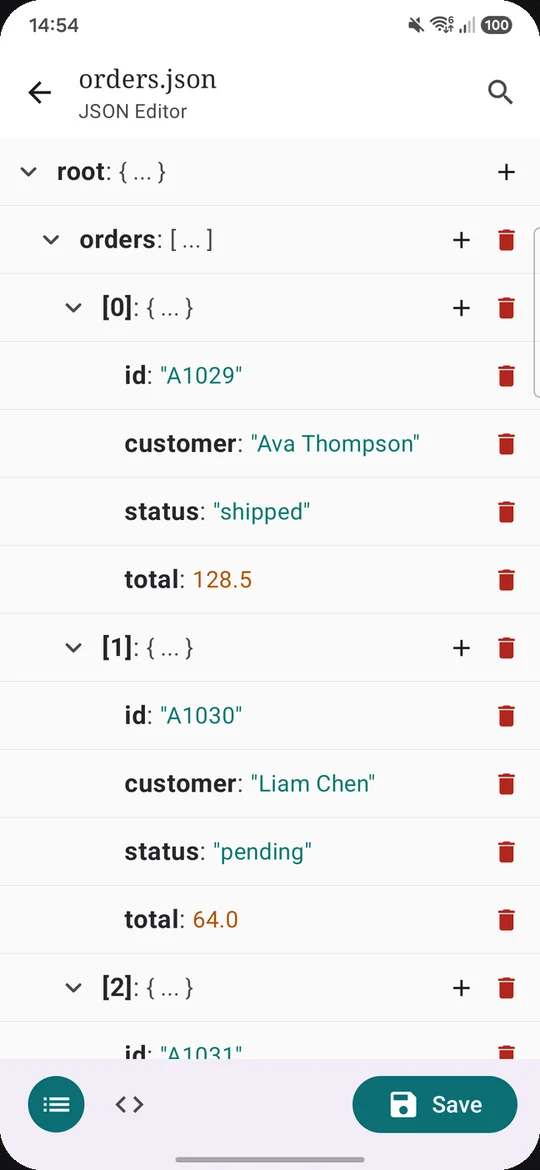
Minified, deeply nested, pretty-printed by someone with odd taste in indentation: it does not matter what the file looks like. Sonnet always renders it as the same indented structure, with keys, strings and numbers in their own colours and every object and array folding away with a tap.
- Collapse what you don’t need, expand what you do
- Tap any value to change it; add or delete fields in place
- Switch to the code view whenever you want the raw text
- Search and jump from match to match Pro
Everything else
Small app. Nothing you’ll miss.
A JSON file opener for every app
Pick a file with the system file picker, or open JSON straight from your file manager, your browser’s downloads, a chat attachment or the share sheet. Sonnet registers as a JSON file opener, so it’s one tap from wherever the file already is.
Fixes almost-JSON as it opens
A missing or trailing comma, an unclosed bracket, unquoted keys, 'single quotes':
strict parsers reject the whole file for one of those. Sonnet repairs the commas and
brackets when the file opens and tells you, and reads the quotes as they are. Save to keep
the fix. When a file genuinely can’t be parsed, it says so instead of guessing.
JSON formatter and minifier
The code view doubles as a JSON formatter. Flip between pretty-printed and minified with one tap, then copy or share whichever you need — no website that wants you to paste production data into it.
A JSON editor with drafts
Edit values, add or remove fields, and save your work as a local draft to come back to. Snippets, fixtures, half-finished configs: they’re still there after you close the app.
Built for big files
Files up to 20 MB open for free, with the tree view for JSON up to about 2 MB. Sonnet Pro raises that to 50 MB files and a 30 MB tree, and adds search — for the database export or log dump that turns most phone apps into a spinner.
Dark mode that means it
A real dark theme with its own syntax colours, not an inverted screen. It follows your system setting, so the 2 a.m. incident reads as comfortably as the 2 p.m. one.
Why Sonnet
The best JSON viewer is the one that stays out of your way
Search the Play Store for a JSON viewer and you’ll find plenty — every one of the most-installed JSON viewers and editors we checked shows ads. Sonnet was built on the opposite bet.
| Most JSON apps on Play | Sonnet | |
|---|---|---|
| Ads | Shown, with a paid upgrade to remove them | None, in any version |
| Paying | Pay to make the ads stop | Free; one optional one-time unlock for big files and search |
| Your data | Web formatters take it onto their servers | Never leaves the phone |
| Editing | Often read-only, or raw text only | Tap-to-edit tree plus code view |
“Shows ads” per each app’s Google Play listing, checked 13 September 2026 — the full comparison is in how to open a JSON file on Android.
Offline and private
Your JSON is nobody else’s business
API keys, customer records, tokens in a config file — the things people open in a JSON viewer are exactly the things that shouldn’t be uploaded. Sonnet parses and renders everything on the device. There is no account, no sync and no server holding your files.
- 100% offlineWorks in airplane mode. Your files are processed locally.
- No adsNot now, not in a “free version”, not ever.
- No accountNothing to sign up for, nothing to sign in to.
- Pay once, if you wantSonnet Pro is a one-time unlock. No subscription.
The JSON app you keep on your phone
Free on Google Play. Takes a few seconds to install, and the next JSON file someone sends you opens with one tap.